Getting Started
Welcome to the Logi Actions SDK! This guide will help you get started with developing plugins and actions for Logitech devices. Follow the steps below to initiate your development journey and unlock the full potential of the Actions SDK.

Study the features of Logi Actions SDK and compare the C# and Node.js SDKs to choose yours.

Choose your preferred SDK and follow the installation guide: C# SDK or Node.js SDK.

Generate a ready-to-use plugin project with a single SDK command. Then implement your custom actions to extend Logitech devices with new features.

Test your plugin with one of the supported devices: devices with physical screens (MX Creative Console, Loupedeck), or MX mice/keyboards using the on-screen Actions Ring overlay.

Once your plugin is developed and tested, you can share it with a broader audience by submitting it to the Logi Marketplace. This allows users to seamlessly discover, download, and install your plugin on their Logitech devices.
Prerequisites
To get started, make sure you have the following:
- A computer with a Windows or macOS operating system
- Logi Options+ or Loupedeck software installed
- A compatible device for controlling the plugin (see Supported Devices)
System Overview
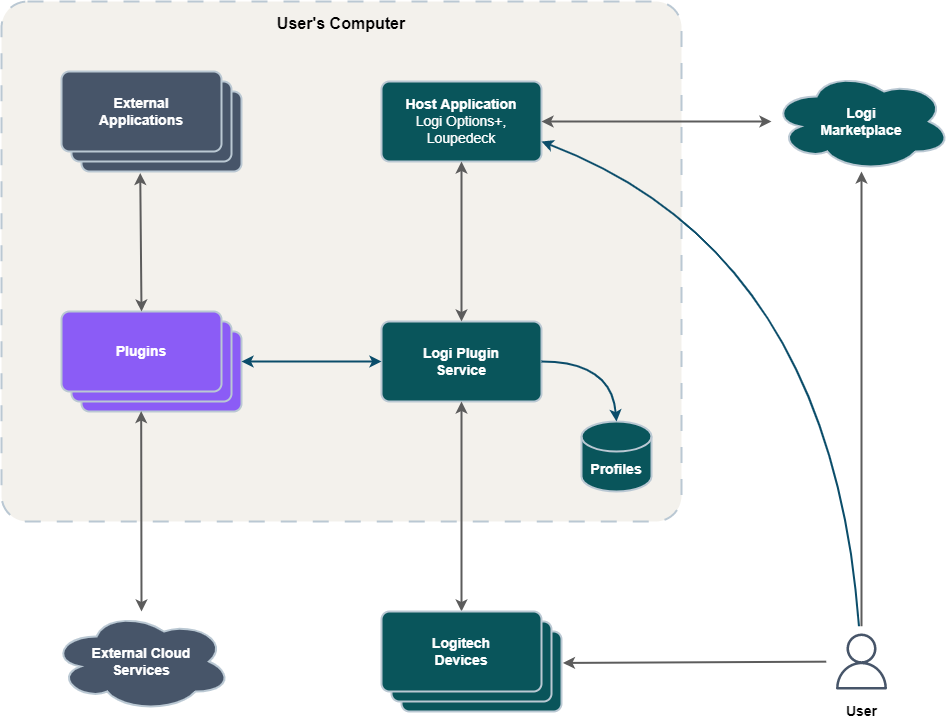
The following diagram provides a high-level overview of the SDK runtime environment and involved software:
-
Host Application: Desktop software where users install plugins, configure actions, and map them to device controls. Supported applications are Logi Options+ and Loupedeck, with G HUB support planned for 2026.
-
Logi Plugin Service: Facilitates communication between the Host Application and plugins, managing plugin lifecycle, action execution, profile storage, and device control mapping.
-
Plugins: Software extensions that provide custom actions for Logitech devices. Plugins typically integrate with external applications or cloud services.
-
External Applications and Cloud Services: Third-party desktop applications and web services that plugins interact with. Examples include Adobe Photoshop and Spotify.
-
Logitech Devices: The supported hardware and virtual devices that users interact with to execute plugin actions. Examples include MX Creative Console, Loupedeck CT, and Actions Ring.
-
Profiles: A profile maps actions to device controls for a specific application or workflow. Profiles are stored locally and can be customized to fit user needs.
-
Marketplace: The official platform for discovering, downloading, and installing plugins, profiles, and other extensions for Logitech and Loupedeck devices. The Marketplace provides developers with a distribution channel and users with a central hub for expanding device functionality.
Choosing Between C# and Node.js SDKs
The Logi Actions SDK offers two development paths: C# SDK and Node.js SDK (alpha). Each SDK is designed for different developer preferences and plugin development needs.
At a Glance:
- C# SDK: Established, full feature set, C# language, intermediate+ experience required
- Node.js SDK: Simpler implementation, TypeScript/JavaScript, beginner-friendly, limited features (expanding)
When to Choose C# SDK:
- You have experience with C# and .NET development
- Your plugin requires advanced features
- You have intermediate or advanced programming experience
When to Choose Node.js SDK:
- You prefer TypeScript or JavaScript over C#
- Basic functionality is sufficient for your plugin
- You want simpler implementation with less code
- You have little programming experience or are getting started
The main differences between the two SDKs are summarized in the table below:
| Comparison | C# SDK | Node.js SDK (alpha) |
|---|---|---|
| Language and Runtime | C# (.NET) | TypeScript/JavaScript (Node.js) |
| Platform Support | Windows and macOS | Windows (macOS support coming soon) |
| Maturity | Original, established SDK | Alpha version available |
| Required Experience | Intermediate coding skills | Minimal programming experience |
| Available Features | Full Plugin API feature set | Limited feature set (expanding) |
| Plugin Implementation | More boilerplate code required, but offers greater control and flexibility | Less code, simpler to implement |
| Plugin Architecture | Plugin is a C# assembly (DLL) that runs within Logi Plugin Service; developers implement plugins using a C# class library interface provided by Logi Plugin Service | Each plugin runs as a separate Node.js process and communicates with Logi Plugin Service using IPC; developers use the Node.js SDK library to implement plugins |
Get started with C# SDK  C# C# | Get started with Node.js SDK  Node.js Node.js |
Tips, Tutorials, and More
Eager to learn more? Here's some content and tips to guide you forward.

Plugin Basics
Learn the core concepts for plugin development including actions, profiles, and the Logi Plugin Service.

Free Codecademy Course
Learn to build custom plugins for Logitech MX Devices using C# and the Logi Actions SDK by creating a Git automation workflow.

 CHECK ON GITHUB
 JOIN ON DISCORD